How to File ITR-1 Online for AY 2026-27: A Step-by-Step Guide
Income Tax Return-1 (ITR-1), commonly known as Sahaj (meaning “easy” in Hindi), is the simplest income tax return form available for individual taxpayers in India. It is primarily designed for residents with straightforward income sources such as salary, one house property, and interest income.
This guide explains how to file ITR-1 for Assessment Year AY 2026-27, which relates to income earned between April 1, 2024 and March 31, 2025.
The guide covers eligibility criteria, required documents, the filing process, important deadlines, and practical tips for first-time taxpayers. The objective is to provide clear and comprehensive information so that even new taxpayers can confidently complete their ITR-1 filing online.
What is ITR-1 (Sahaj)?
ITR-1 (Sahaj) is an income tax return form intended for individual taxpayers with simple income structures. The Income Tax Department refers to this form as “Sahaj” because it is easier to complete compared to other ITR forms.
This form is applicable only to resident individuals (not companies, partnerships, or other entities) whose total income falls within a specified limit and arises from certain permitted sources.
If you meet the eligibility criteria for ITR-1, you can report your income, deductions, and taxes in a single form to fulfil your annual tax filing requirement. The form is designed in a simplified format that includes sections for:
- Personal information
- Income details
- Deductions and exemptions
- Tax calculation and payment details
For AY 2026-27, certain updates have been introduced to slightly expand the scope of ITR-1. One key change is that limited capital gains can now be reported in this form, which was not permitted earlier. Despite these changes, ITR-1 continues to be the preferred option for salaried individuals and pensioners with uncomplicated income sources.
Who is Eligible to File ITR-1?
You can file ITR-1 for AY AY 2026-27 if all the following conditions are satisfied:
Residential Status:
You must be a resident individual for tax purposes (ordinary resident). Non-Resident Indians (NRIs) and Resident but Not Ordinarily Residents (RNOR) are not eligible to use ITR-1.
Total Income Limit:
Your total income during the financial year must not exceed ₹50 lakh. If your income is higher than this amount, you will need to file a different ITR form.
Eligible Sources of Income:
Your income should fall under one or more of the following categories:
- Salary or Pension: Income received from employment or pension from one or multiple employers.
- One House Property: Income from a single residential property, whether self-occupied or rented. If you own more than one property, ITR-1 cannot be used.
- Other Sources: Income such as bank interest, fixed deposit interest, dividends, or family pension. However, income from lottery winnings or horse racing is not permitted under ITR-1.
- Small Agricultural Income: Agricultural income up to ₹5,000 is allowed under this form.
Long-Term Capital Gains (Limited Scope):
For AY 2026-27, taxpayers can report long-term capital gains (LTCG) from the sale of listed equity shares or equity mutual funds under Section 112A using ITR-1, provided the gains do not exceed ₹1.25 lakh.
This represents a change from previous years, where any capital gains automatically disqualified a taxpayer from using ITR-1. If the LTCG exceeds ₹1.25 lakh, or if there are other types of capital gains or capital losses to carry forward, the taxpayer must file ITR-2 or another applicable form.
Step-by-Step Guide to File ITR-1 Online
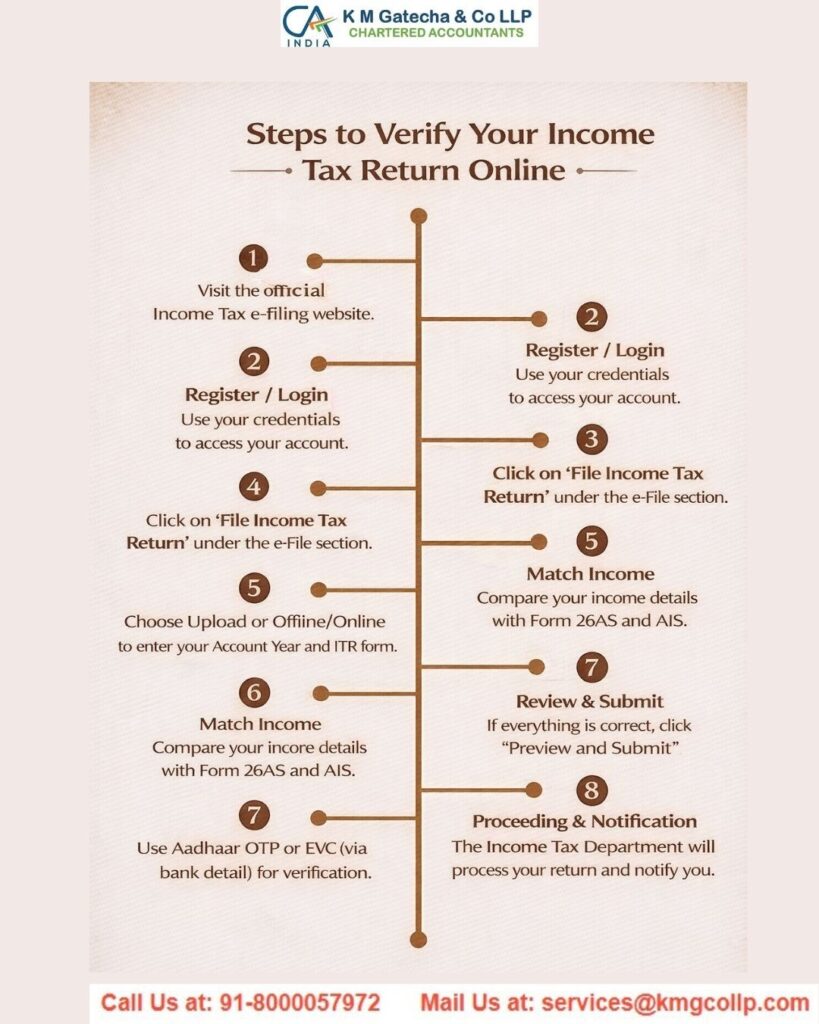
Filing ITR-1 through the Income Tax e-Filing portal is a simple and structured process. Below is a clear step-by-step guide for Assessment Year AY 2026-27.

Step 1: Log in to the Income Tax e-Filing Portal
Visit the Income Tax e-Filing website and sign in using your User ID (PAN) and password.
If you are filing for the first time, you must first register by selecting the “Register” option and creating an account using your PAN details. Ensure that you have access to your registered mobile number or email address, as you may receive OTPs for verification during login, especially if multi-factor authentication is enabled.
Step 2: Go to “File Income Tax Return”
After logging in, you will be directed to your dashboard. From there, navigate to:
e-File → Income Tax Returns → File Income Tax Return
Selecting this option will begin the return filing process.
Step 3: Select Assessment Year and Mode of Filing
You will be prompted to choose the Assessment Year. Select AY 2026-27, which corresponds to income earned during the financial year 2024-25.
Next, select the mode of filing as “Online.” This option is generally recommended for most individual taxpayers.
Click Continue to proceed.
Step 4: Start a New Filing
If you have previously saved a draft return for the same assessment year, the portal may display an option to “Resume Filing.”
If no draft exists, select “Start New Filing” to begin a new return.
Step 5: Select Your Status
You will be asked to select your filing status. Choose “Individual,” as ITR-1 is applicable only to individual taxpayers.
You may also need to confirm whether you are filing the return on your own behalf or as a representative. Most taxpayers will select “Self.”
After selecting the appropriate option, click Continue.
Step 6: Choose the ITR Form (ITR-1)
The portal will display a list of available ITR forms based on your profile.
Select ITR-1 (Sahaj) from the list and click Proceed to continue with the filing process.
Step 7: Select Reason for Filing (If Applicable)
You may be asked to specify the reason for filing the return, especially if your income is below the basic exemption limit.
Common reasons include:
- Income exceeds the basic exemption limit
- Claiming a tax refund
- Meeting specific compliance requirements (such as high electricity expenses or foreign travel)
Select the relevant reason or reasons and click Continue.
Step 8: Choose the Tax Regime (Old vs New)
You will now enter the main form interface.
For AY 2026-27, the New Tax Regime is the default option under the law. This means the system will initially assume that you are filing under the new regime, which generally offers lower tax rates but restricts many deductions.
You will see a question such as:
“Do you want to opt out of the New Tax Regime?”
- Selecting “No” means you will continue under the new regime.
- Selecting “Yes” allows you to switch to the Old Tax Regime, where deductions such as Section 80C investments, HRA, and other benefits can be claimed.
Choose the option carefully. If you are uncertain, it is advisable to compare your tax liability under both regimes before making a decision.

Step 9: Fill in Personal and General Information
The first section of the form is typically Part A: General Information, which contains your personal details.
Many fields are automatically pre-filled from your profile, including:
- Name
- PAN
- Date of Birth
- Aadhaar Number
- Address
- Email ID
- Mobile Number
Review each detail carefully to ensure accuracy.
You must also confirm your Nature of Employment, such as:
- Government employee
- Public sector employee
- Private sector employee
- Pensioner
After verifying all details, click Confirm or Save to proceed.
Step 10: Enter Income Details
Your income information is often pre-filled based on data available with the Income Tax Department. Carefully review these details before moving forward.
If any information is missing or incorrect, you can manually add or update the details as required.
As you complete each section, the system will automatically calculate your Gross Total Income, which represents the total income from all applicable sources. Use the Save or Confirm option in each section to validate your entries before continuing.
Step 11: Enter Deductions (Part C – Deductions and Taxable Income)
After entering all your income details, the next step is to declare deductions under Chapter VI-A. This is where you can claim tax-saving investments and eligible expenses. If you have opted for the new tax regime, keep in mind that most deductions such as 80C, 80D, and HRA are not allowed. Only a few deductions, like the employer’s contribution to NPS under Section 80CCD(2), are permitted.
The system will automatically calculate the total deductions and subtract them from your Gross Total Income to arrive at your Taxable Income in Part C. This is the amount on which your tax will be computed. It’s a good idea to verify this figure with your own estimates based on Form 16 and other income sources.
Step 12: Tax Calculation (Part D – Tax Computation)
Once all income and deduction details are entered, the portal will automatically compute your tax liability. It applies the relevant slab rates based on your chosen tax regime and adds applicable charges like the 4% health and education cess. A summary of the tax calculation will be displayed, which you should review carefully.
Step 13: Pay Tax if Required
If the calculation shows that additional tax is payable—possibly due to insufficient TDS or untaxed income—you will be given the option to pay immediately or later. It is strongly advisable to clear the dues right away using the “Pay Now” option before submitting your return.
You will be redirected to the e-Pay Tax facility, where you can make the payment through net banking, debit card, UPI, and other methods. Once the payment is completed, details like the BSR code and challan number are usually auto-filled in your return.
If you choose to pay later, you can still proceed with filing, but your return may be treated as defective until the payment is made, and interest could continue to accumulate. Clearing dues upfront helps avoid these issues.

Step 14: Preview Your Return
Before final submission, you will be able to preview your completed ITR in a read-only format. Carefully review all sections, including personal details, income, deductions, and tax calculations, to ensure everything is accurate.
If you notice any errors, you can go back and make corrections. Once satisfied, confirm the declaration stating that all information provided is correct, and then proceed to validation.
Step 15: Validate and Submit the ITR
The portal will perform a validation check to identify any missing or incorrect information. If any issues are found, they will be listed for you to fix. After resolving them, you can validate the return again.
If no errors remain, you can proceed to submit your ITR. Click on “Proceed to Verification” to complete the filing process. At this stage, your return is filed but still requires verification.
Step 16: Verify Your ITR (e-Verification)
Verification is a mandatory step. Without it, your return will be considered not filed. On the verification page, select your preferred method. The easiest option is e-verification, which can be done through Aadhaar OTP, net banking, or other available methods like bank or DEMAT OTP.
Step 17: Acknowledgement
After successful e-verification, your filing process is complete. You will receive a confirmation message and can download the acknowledgement (ITR-V) for your records. A confirmation will also be sent to your registered email and mobile number. Keep this document safely as proof of filing.
If you face any confusion during the process, the portal provides guidance through help icons and FAQs. You can also save your progress as a draft and continue later, but ensure submission before the due date.
Who Cannot File ITR-1?
You are not eligible to use ITR-1 if any of the following apply:
If your total income exceeds ₹50 lakh during the financial year.
If you are a non-resident or a resident but not ordinarily resident, as ITR-1 is only meant for resident and ordinarily resident individuals.
If you have income from more than one house property.
If you earn income from a business or profession, including freelance or consultancy work.
If you have capital gains that do not fall within the limited exemption allowed under Section 112A, such as short-term gains, higher long-term gains, or gains from property sales.
If your agricultural income exceeds ₹5,000.
If you have any foreign income, own foreign assets, or hold a foreign bank account or signing authority abroad.
If you are a director in a company or have invested in unlisted shares.
If TDS has been deducted under Section 194N on large cash withdrawals.
If you have opted for deferred tax on ESOPs as a startup employee.
If you are claiming foreign tax relief under Sections 90, 90A, or 91.
If any of these conditions apply, you must choose a different ITR form such as ITR-2 or ITR-3, depending on your situation.
Important Deadlines and Penalties
Filing your income tax return on time is essential to avoid penalties and unnecessary complications. Below are the important dates for AY 2025–26 (FY 2024–25) and what happens if you miss them:
The due date for filing the original return has been extended to 15 September 2025. It is recommended to file early instead of waiting until the last moment to avoid heavy traffic or technical glitches on the portal.
If you miss this deadline, you can still submit a belated return up to 31 December 2025. However, late filing attracts a penalty under Section 234F. If you file after 15 September, a fee of up to ₹5,000 may apply. For individuals with total income up to ₹5 lakh, the fee is limited to ₹1,000.
Filing late can also delay any refund due and may result in losing certain benefits, such as the ability to carry forward specific losses like house property or capital losses.
In case you notice any errors after filing your return, you have the option to submit a revised return. The deadline for revising the return for AY 2025–26 is 31 December 2025, or before the assessment is completed, whichever comes first. Both belated and revised returns must be filed within this timeframe. Even if your return was filed late, you are still allowed to revise it within the same deadline.
If you choose to verify your return later, ensure that verification is completed within 30 days of filing. If not verified within this period, the return becomes invalid, and you will need to file a fresh one, which could then be treated as a belated return.
If there are any unpaid taxes and the return is filed late, interest may also be charged under Sections 234A, 234B, and 234C for delays or short payment. This interest is separate from the late filing fee, making it important to clear any dues and file promptly.
Tips for a Smooth ITR-1 Filing Experience
Filing your ITR for the first time can feel overwhelming, but following a few simple practices can make the process easier and error-free:
Ensure your PAN is linked with Aadhaar, as this is mandatory for filing. The details such as name and date of birth must match in both records. If not already linked, complete this step first since filing will not be allowed otherwise.
Refer to Form 26AS and AIS while reporting your income. Match the details of income and TDS shown in these statements with what you declare. This helps avoid missing any income, such as interest, and ensures you claim all TDS credits. Resolve any mismatches beforehand, for example by correcting missing TDS entries.
Confirm that ITR-1 is the correct form for your situation. If you have income that does not fall under its eligibility criteria, choose the appropriate form like ITR-2. Filing with the wrong form may result in your return being treated as defective.
Decide carefully between the old and new tax regimes before filing. The portal usually selects the new regime by default. If you intend to claim deductions and find the old regime more beneficial, make sure to opt for it at the beginning. Once filed, the choice cannot be changed for that year.
Enter all personal and financial details accurately. Keep your address, email, phone number, and bank details updated to ensure smooth communication and timely refunds. Also verify pre-filled information such as PAN, Aadhaar, and employment category.
Declare all sources of income, even small amounts like interest or occasional earnings. Disclosing exempt income, such as PPF interest or gifts from specified relatives, is also advisable to avoid discrepancies with AIS records.
If you are following the old tax regime, make sure to claim all eligible deductions, such as those under Sections 80TTA or 80GG, wherever applicable. While deductions can reduce your tax liability, only claim those for which you have valid proof, as you may need to provide supporting documents later.
Final Thoughts
Filing your income tax return is a key annual obligation for every earning individual. The ITR-1 (Sahaj) form makes this process easier for those with simple income sources, and the online filing system has made it more accessible than ever. By knowing your eligibility, keeping the required documents ready, and following the step-by-step procedure, you can complete your ITR-1 filing with confidence on your own.
For Assessment Year 2025–26, there are a few updates such as the inclusion of limited capital gains and the default selection of the new tax regime. However, the core purpose of ITR-1 remains unchanged—it is designed to provide a simple and hassle-free filing experience for taxpayers.
Make the most of your savings with high-interest savings accounts and deposit options. Whether you need funds for personal use or business growth, you can explore MSME loans or micro loans with competitive rates and quick disbursal. Vehicle and home loan options are also available to suit your specific needs, ensuring a convenient and reliable banking experience.
Disclaimer: The content on this website is for informational purposes only and does not constitute legal, financial, or professional advice. Please consult qualified experts before acting on any information. K M GATECHA & CO LLP accepts no liability for errors, omissions, or outcomes from the use of this content. This site is not an advertisement or solicitation.