
Online TAN Number Application for buying NRI property in India
When a person buys property from Non-Resident Indian (NRI) in India, tax deduction at source (TDS) becomes mandatory under the Income Tax Act, 1961. To execute this legally, the buyer must obtain a TAN Number for NRI Property Purchase.
The TAN (Tax Deduction and Collection Account Number) is a 10-digit alphanumeric identifier allotted by the Income Tax Department to individuals or entities responsible for deducting or collecting taxes at source.
In every NRI property purchase, the buyer (resident or non-resident) must deduct TDS from the sale consideration and deposit it with the government. This is only possible with a valid TAN number.
Without a TAN, the bank will not process TDS payments, and the TIN facilitation centres will reject returns. Hence, TAN application for NRI property transactions is a mandatory compliance step.
TAN Number is a crucial identification for every taxpayer in India. It is a 10-digit alphanumeric code assigned to individuals or entities responsible for deducting or collecting taxes at the source. Whether you’re acting in an individual capacity or as a business, having a TAN number is essential for seamless daily operations in India.
This number must be quoted when filing payment challans, certificates, Annual Information Returns, TDS (Tax Deducted at Source), TCS (Tax Collected at Source), and similar transactions. Without a valid TAN number, the TIN (Taxpayer Identification Number) facilitation centres will reject any returns filed. Additionally, banks will not process TDS and TCS challans without it.
What Is TAN Number?
A TAN number (Tax Deduction and Collection Account Number) is issued under Section 203A of the Income Tax Act. It consists of 10 characters — four alphabets, five digits, and a final alphabet (e.g., AHMG02458K).
-
The first three alphabets denote the jurisdiction code.
-
The fourth alphabet represents the deductor’s name.
TAN number is a unique identifier issued by the Income Tax Department and consists of 10 characters—four alphabets, five digits, and an ending alphabet (e.g., PDES03028F). The first three letters signify the jurisdiction code, and the fourth represents the deductee’s name.
Under Section 203A of the Income Tax Act, 1961, providing a TAN number in all TDS returns is mandatory for compliance with Indian tax regulations. It is necessary for reporting tax deductions on salary, dividends, and interest payments and must be included in all TDS/TCS returns, challans, and certificates. Failing to quote the TAN number can lead to a penalty of Rs.10,000.
Why TAN Is Mandatory for NRI Property Purchase
When buying property from an NRI, the buyer is treated as a deductor under Section 195.
Therefore, the buyer must:
-
Deduct TDS at applicable rates (usually 20% or more, depending on capital gains).
-
Deposit the TDS using Challan ITNS 281 under the TAN number.
-
File TDS returns in Form 27Q.
-
Issue Form 16A (TDS certificate) to the NRI seller.
Without TAN, these steps cannot be legally completed.
How To Find Your TAN?
It is now possible to check your TAN details by using either your TAN number or your name. If you’ve forgotten your TAN, you can easily retrieve it. Follow these steps to find your TAN number:
Step 1: Visit the official Income Tax e-Filing website and select the option “Know TAN Details”.
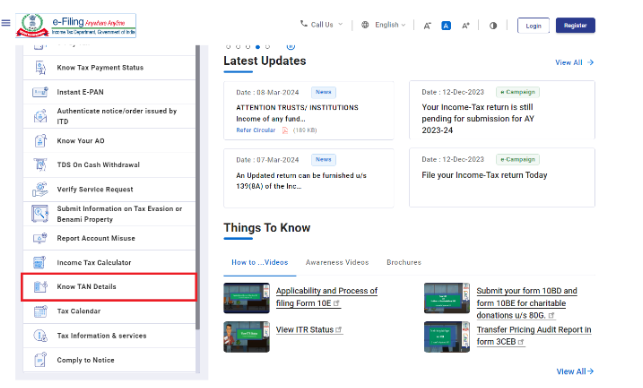
Step 2: Under the ‘TAN Search’ section, you will see the options ‘TAN’ or ‘Name.’
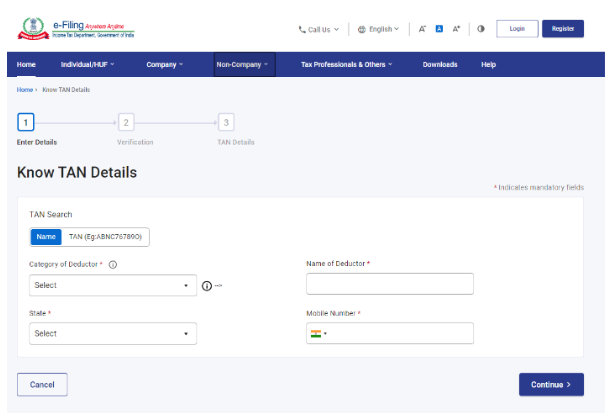
Step 3: Choose either ‘TAN’ or ‘Name’ based on your preference.
Step 4: If you opt for the Name option, select the ‘Category of Deductor’ and state, then enter the Deductor’s Name, your registered mobile number, and click on ‘Continue.’
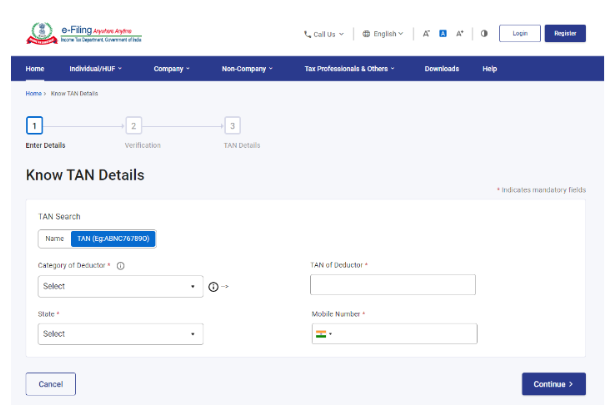
If you choose the TAN option, select the ‘Category of Deductor’ and state, then enter the Deductor’s TAN. Provide your registered mobile number and click ‘Continue.’
Step 5: You will receive an OTP on your registered mobile number.
Step 6: Enter the OTP and click on the ‘Validate’ button. Your TAN details will be displayed on the screen.
TAN Application Online|TAN Application for NRI Property Purchase – Step-by-Step Process
Step 1: Visit the official NSDL TAN website.
Step 2: Click on the option ‘Online Application for TAN (Form 49B)’.
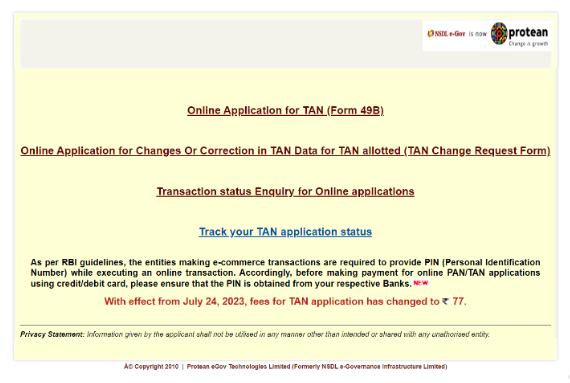
Step 3: Select the ‘Apply for new TAN’ option and choose the relevant category of deductors.
Step 4: The TAN application form will appear. Fill out the form carefully, ensuring all mandatory fields marked with * are completed. If any data does not meet the required format, an error message will be displayed. You must correct these errors before re-submitting the application.
Step 5: If your form has no errors, a confirmation screen will appear. You can select the edit option on this screen if you need to modify any information.
Step 6: Once you’ve reviewed all the details, click ‘Confirm.’
Step 7: Proceed to pay the required fees online. Payment can also be made via cheque, DD, or credit/debit card in favor of NSDL-TIN.
Step 8: After successful payment, you will receive an acknowledgement slip with a 14-digit acknowledgement number, which can be used to track your application status. Save and print the slip, and send it along with the required documents to Protean eGov Technologies Ltd.
TAN Application Offline
If you prefer an offline process, visit the nearest TIN Facilitation Centre (TIN-FC) and submit Form 49B.Payment can be made via cash, cheque, or demand draft. Ensure all supporting documents—PAN copies, property details, and buyer identification—are attached.
Step 1: Visit the nearest TIN Facilitation Centre and obtain Form 49B. Alternatively, you can download it from the Income Tax website. If your business is not registered under the Companies Act, you will need to fill out Form INC-7.
Step 2: After completing the form, submit it at the TIN counter along with the processing fee. Payment can be made via cheque, cash, or demand draft (DD).
How To Find Your TAN Jurisdiction Building Name?
Follow these steps to know the name of your TAN jurisdiction building:
Step 1: Go to the official Income Tax website.
Step 2: Navigate to the ‘Important Links’ section.
Step 3: Click on ‘Jurisdiction’.
Step 4: Select your state.
Step 5: You will be redirected to a PDF file.
Step 6: Find your TAN jurisdiction building’s name in the list provided in the PDF.
How to check TAN details for property purchase from NRI
You can find your TAN details either by TAN number or Name:
-
Visit the Income Tax e-Filing website.
-
Click “Know TAN Details”.
-
Choose to search by TAN or Name.
-
Enter required details and validate using OTP received on your registered mobile number.
-
Your TAN information will appear on screen.
How To Download TAN Certificate?
Follow these steps to download your TAN certificate online:
Step 1: Go to the NSDL TIN website to download your TAN certificate.
Step 2: Select ‘Application Type’ as ‘TAN-New/ Change Request’.
Step 3: Enter your ‘Acknowledgement Number’ received during your TAN application.
Step 4: Input the captcha code and click on ‘Submit’.
Step 5: Your TAN status will appear on the screen.
Step 6: Look for the statement ‘Click here to download your TAN Allotment Letter’ and click on it to download your TAN certificate.
Conclusion
It is essential to obtain a TAN number for filing TCS, TDS, or any other tax returns. Failure to quote your TAN number while submitting tax returns can lead to a penalty of Rs.10,000. Therefore, it is crucial to apply for your Tax Deduction and Collection Account Number as soon as possible.
Disclaimer: The content on this website is for informational purposes only and does not constitute legal, financial, or professional advice. Please consult qualified experts before acting on any information. K M GATECHA & CO LLP accepts no liability for errors, omissions, or outcomes from the use of this content. This site is not an advertisement or solicitation.