How to Make Advance Tax Payments Online
In India, over 6.77 crore income tax returns were filed for A.Y. 2023–24, reflecting the growing number of taxpayers complying with tax regulations. A common question for individuals and businesses is whether they are required to pay advance tax during the financial year.
In many cases, Tax Deducted at Source (TDS) or Tax Collected at Source (TCS) is already deducted from income. However, these deductions may be less than the total tax payable. Therefore, understanding the obligation to pay advance tax and the consequences of non-payment or delayed payment is essential for proper tax planning and compliance.
What is Advance Tax?
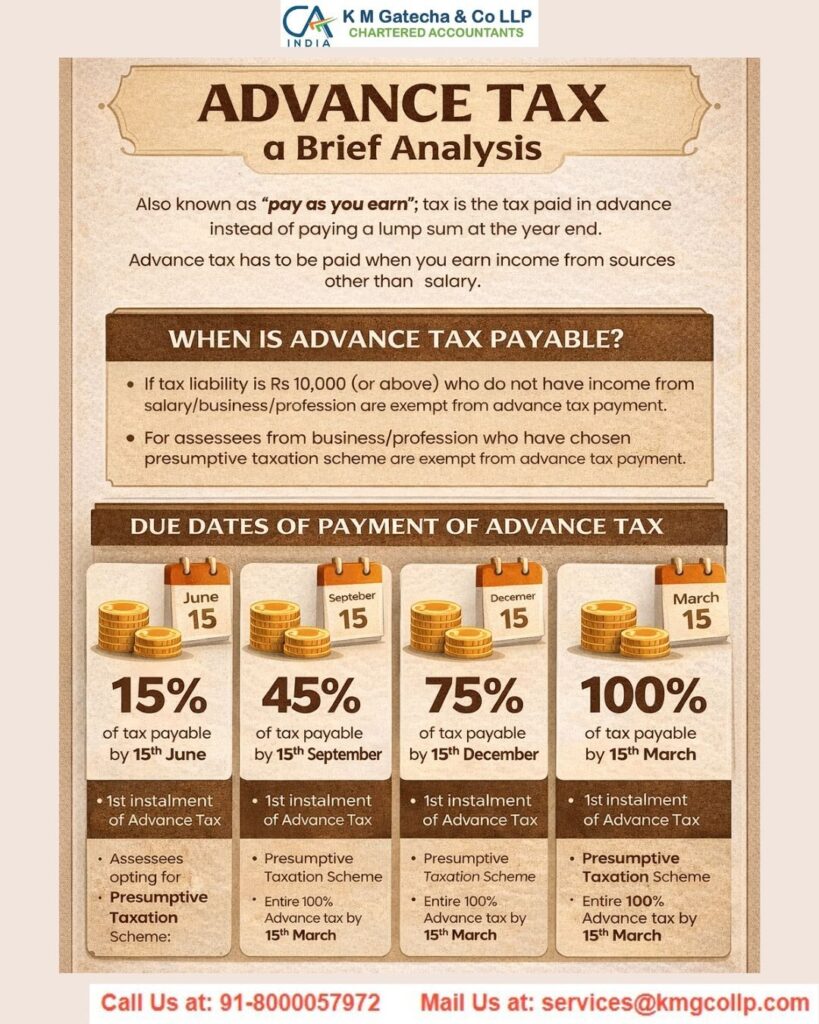
Advance tax refers to the payment of income tax in installments during the financial year, instead of paying the entire amount at the time of filing the income tax return. It is commonly known as the “pay-as-you-earn” system.
Under the provisions of the Income-tax Act, 1961, taxpayers are required to estimate their total income for the financial year and calculate the tax payable after considering TDS and TCS. Based on this estimation, they must pay the applicable tax in advance on specified due dates.
Paying advance tax helps:
- Avoid a large tax burden at year-end
- Reduce interest penalties
- Ensure smooth tax compliance
- Maintain proper financial planning
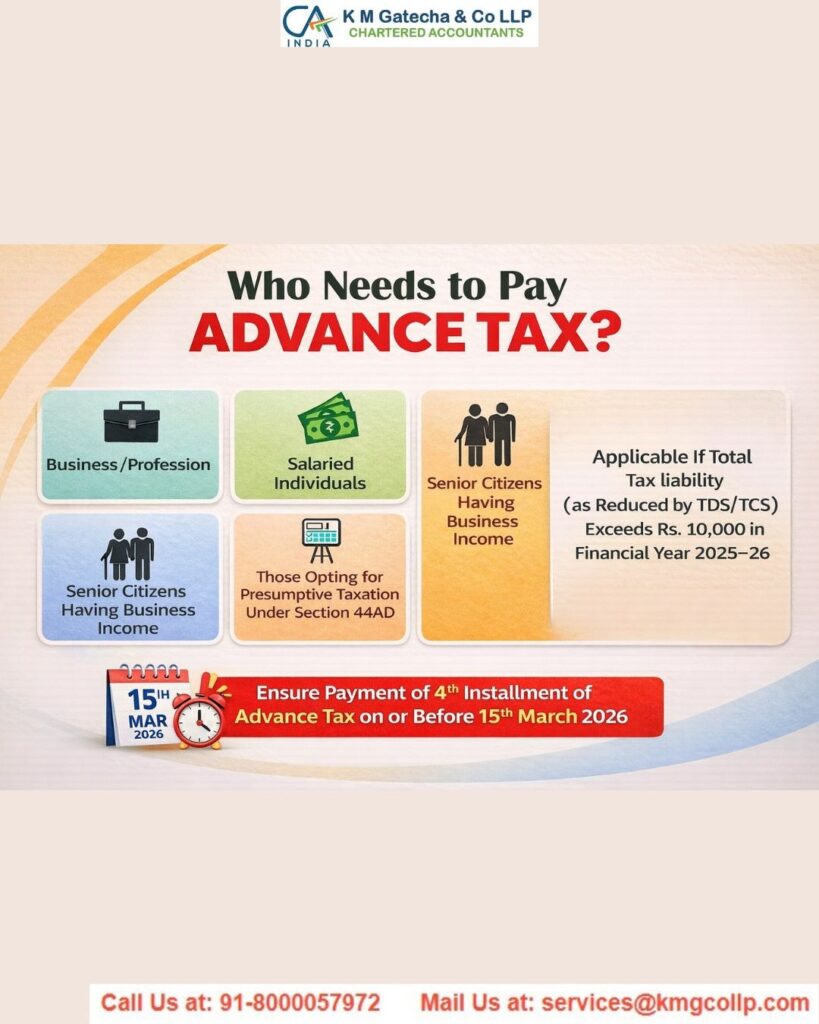
Advance tax applies to salaried individuals with additional income, freelancers, professionals, business owners, and companies whose tax liability exceeds the prescribed threshold.
Who is Liable to Pay Advance Tax?
Advance tax must be paid by taxpayers when their total tax liability is ₹10,000 or more in a financial year after adjusting TDS and TCS.
The following categories are generally liable to pay advance tax:
- Self-employed professionals
- Business owners
- Freelancers and consultants
- Individuals earning rental income
- Individuals earning capital gains
- Companies and partnership firms
Exemption from Advance Tax
A resident senior citizen (aged 60 years or above) is not required to pay advance tax if they do not have income from business or profession.
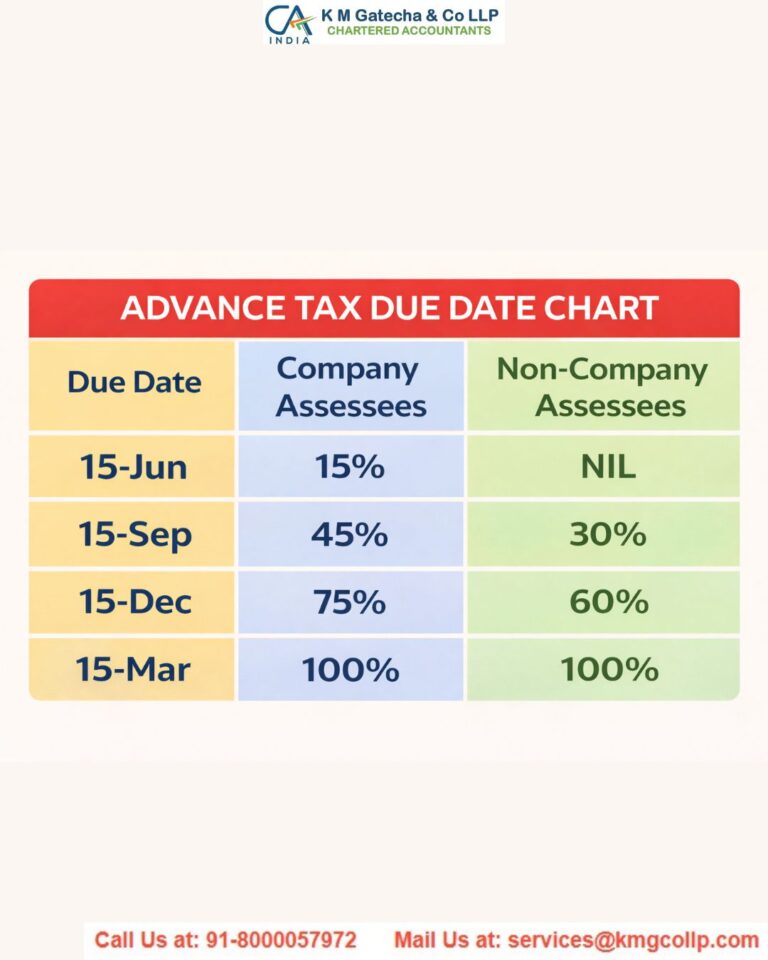
Due Dates for Payment of Advance Tax
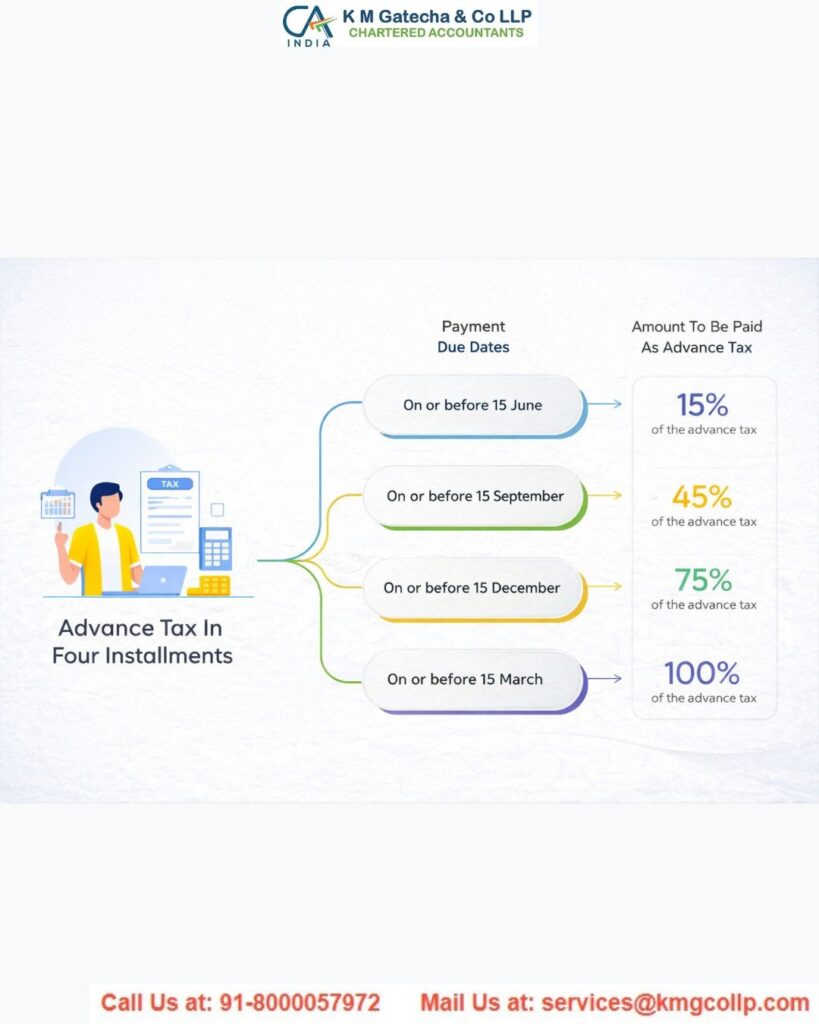
Advance tax must be paid in installments according to the schedule prescribed under the Income-tax Act.
| Due Date | Advance Tax Installment |
| On or before June 15 | 15% of total tax liability |
| On or before September 15 | 45% of total tax liability |
| On or before December 15 | 75% of total tax liability |
| On or before March 15 | 100% of total tax liability |
Any tax paid up to March 31 is also treated as advance tax for that financial year.
How to Calculate Advance Tax
Calculating advance tax requires estimating your total income for the financial year and determining the tax payable based on applicable income tax rates. This process helps taxpayers plan their finances, avoid penalties, and ensure timely compliance with the provisions of the Income-tax Act, 1961.
Advance tax calculation is particularly important for freelancers, business owners, professionals, and individuals with multiple sources of income. By calculating advance tax correctly, taxpayers can spread their tax payments across the year instead of paying a large amount at the end of the financial year.
Step-by-Step Process to Calculate Advance Tax
1. Estimate Your Total Income
Begin by estimating all sources of income you expect to earn during the financial year. This may include:
- Salary income
- Business or professional income
- Rental income
- Capital gains
- Interest income from savings or fixed deposits
- Other miscellaneous income
Accurate estimation of income is the foundation for calculating advance tax correctly.
2. Calculate Total Income
Add all estimated income sources to determine your gross total income for the financial year. This step provides a complete view of your expected earnings and helps determine your tax liability.
3. Deduct Allowable Deductions and Set Off Losses
Next, subtract eligible deductions and adjust past losses to arrive at your taxable income.
Common deductions include:
- Life insurance premium
- Health insurance premium
- Public Provident Fund (PPF) contributions
- Home loan principal repayment
- Eligible business losses from previous years
If you choose the new tax regime, certain deductions may not be allowed. Therefore, ensure you calculate your taxable income based on the tax regime selected.
4. Apply Applicable Income Tax Slabs
Calculate the tax on your taxable income using the applicable income tax slab rates for the financial year.
Important considerations:
- Tax slabs differ for the old tax regime and new tax regime
- Special income such as capital gains may be taxed at different rates
- Rates may change each financial year
This step determines your basic tax liability.
5. Add Surcharge and Health & Education Cess
After calculating the basic tax amount, add applicable additional charges:
- Surcharge (if income exceeds specified limits)
- Health and Education Cess (currently 4%)
These charges increase the final tax payable.
6. Deduct TDS and TCS
Subtract any taxes already paid or deducted during the year, including:
- Tax Deducted at Source (TDS)
- Tax Collected at Source (TCS)
This adjustment ensures you only pay the remaining tax liability.
7. Determine Advance Tax Liability
Your advance tax liability is calculated as:
Advance Tax Payable = Total Tax Liability – TDS/TCS Already Paid
If the remaining tax liability is ₹10,000 or more, you are required to pay advance tax.
8. Divide the Tax into Installments
If advance tax is applicable, divide the amount into installments according to the prescribed schedule:
- By June 15 – 15% of total tax liability
- By September 15 – 45% of total tax liability
- By December 15 – 75% of total tax liability
- By March 15 – 100% of total tax liability
You can revise the amount in later installments if your income changes during the financial year.
9. Make the Advance Tax Payment
Pay the calculated advance tax amount on or before the due dates using:
- Online payment through the Income Tax e-Filing portal
- Net banking or debit card
- UPI or other digital payment methods
- Authorized bank branches (for eligible taxpayers)
Timely payment helps avoid penalties and ensures smooth tax compliance.
Benefits of Paying Advance Tax
Paying advance tax on time provides several advantages for taxpayers and businesses.
Avoids Interest and Penalties
Timely payment reduces the risk of interest charges under Sections 234B and 234C of the Income-tax Act.
Improves Financial Planning
Paying taxes in installments helps manage cash flow effectively and prevents financial stress at the end of the financial year.
Ensures Compliance with Tax Laws
Regular payment of advance tax keeps taxpayers compliant with legal requirements and reduces the chances of receiving notices from the Income Tax Department.
Supports Government Revenue Flow
Advance tax ensures a steady flow of revenue to the government throughout the year, helping fund public services and infrastructure.
Consequences of Non-Payment or Delay in Advance Tax
Failure to pay advance tax correctly or on time can result in financial penalties and legal consequences.
Interest Charges
Interest may be charged under:
- Section 234B – Interest for non-payment of advance tax
- Section 234C – Interest for delayed payment of installments
These charges increase the total tax liability.
Income Tax Notice
Incorrect estimation or non-payment of advance tax may lead to:
- Notice from the Income Tax Department
- Additional interest and penalties
- Increased compliance burden
Timely calculation and payment of advance tax helps avoid these issues.
Methods for Advance Tax Payment
The method of payment depends on the type of taxpayer.
Mandatory Electronic Payment
Electronic payment is compulsory for:
- Companies
- Taxpayers subject to tax audit under Section 44AB
Optional Payment Methods
Other taxpayers can pay advance tax using:
- Online payment through the e-Filing portal
- Net banking or digital payment modes
- Physical payment at designated bank branches using a Challan Reference Number (CRN)
Steps for Online Payment of Advance Tax
Taxpayers in India can conveniently pay advance tax online through the Income Tax e-Filing portal. The portal provides a simple and secure system that allows taxpayers to make payments without visiting a bank branch. One of the easiest methods is paying advance tax without logging in to the income tax portal using the e-Pay Tax option.
Follow the step-by-step process below to make advance tax payments online.
Option A: Pay Advance Tax Without Logging in to the Income Tax Portal
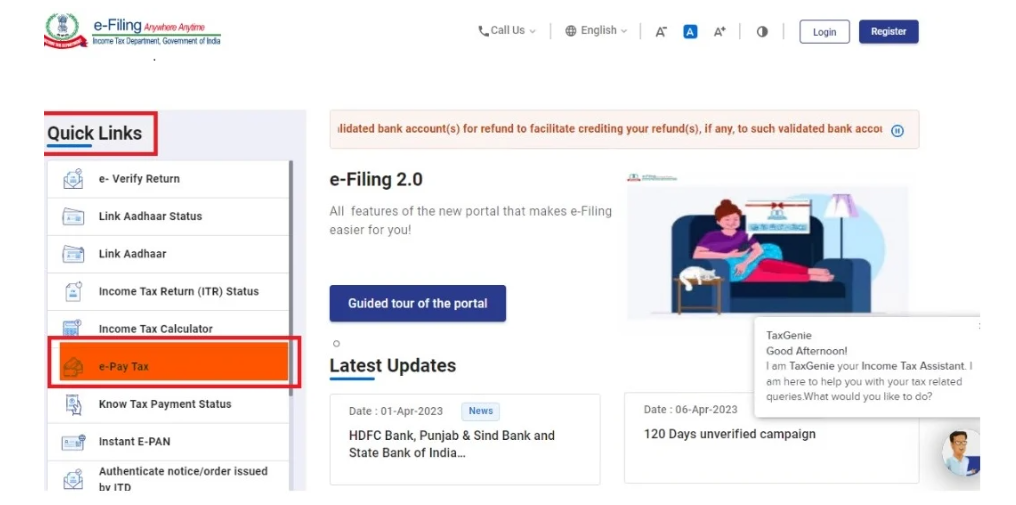
Step 1: Visit the Income Tax e-Filing Portal
Go to the official Income Tax e-Filing portal:
www.incometax.gov.in
Under the Quick Links section, select the “e-Pay Tax” option to begin the payment process.
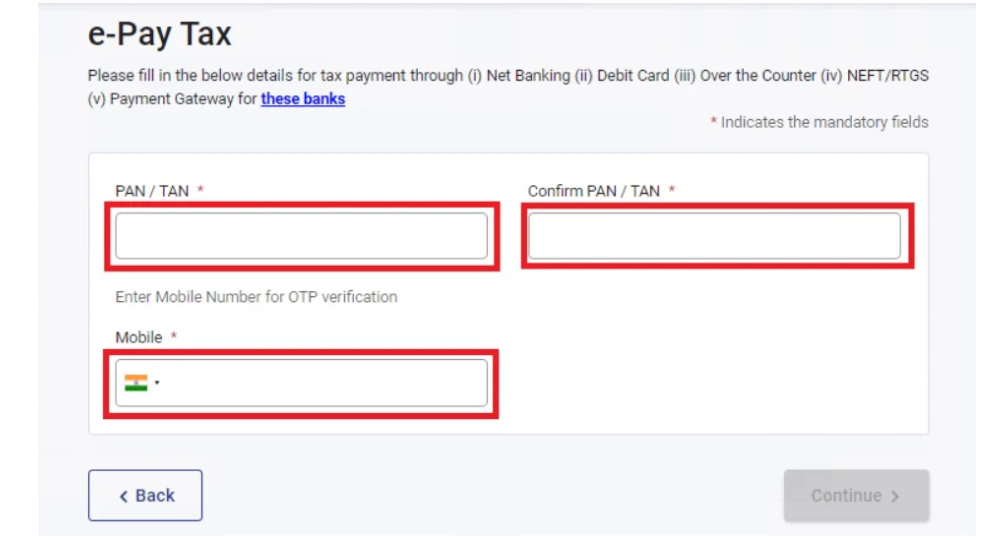
Step 2: Enter PAN Details and Verify OTP
Provide your PAN (Permanent Account Number) and complete the OTP verification using the mobile number linked to your PAN.
After entering the OTP, click “Continue” to proceed to the next step.
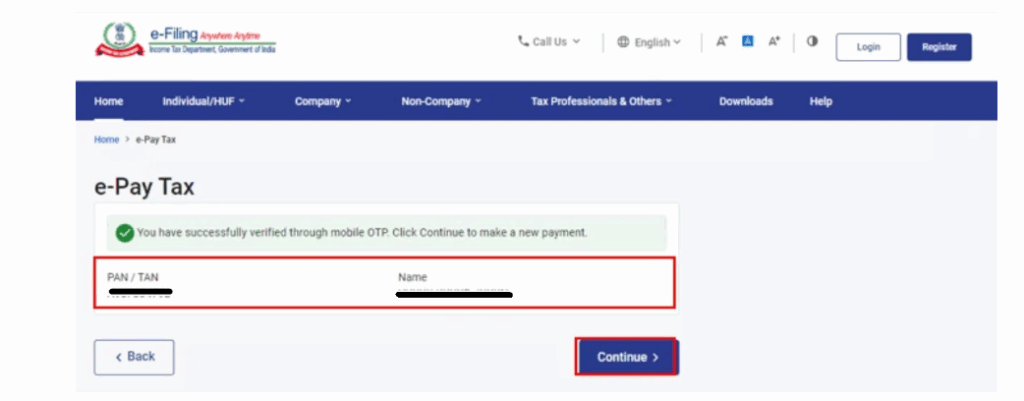
Step 3: Confirm Your Details
Once OTP verification is successful, a confirmation message displaying your PAN and masked name will appear on the screen.
Click “Continue” to move forward.
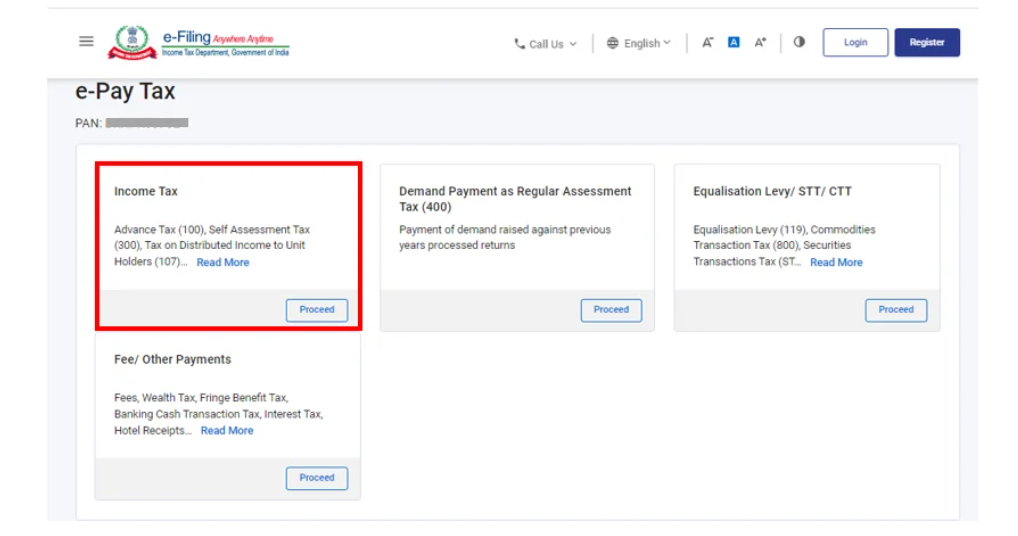
Step 4: Select the Income Tax Payment Option
On the next screen, locate the “Income-tax” section and click “Proceed” to initiate the tax payment process.
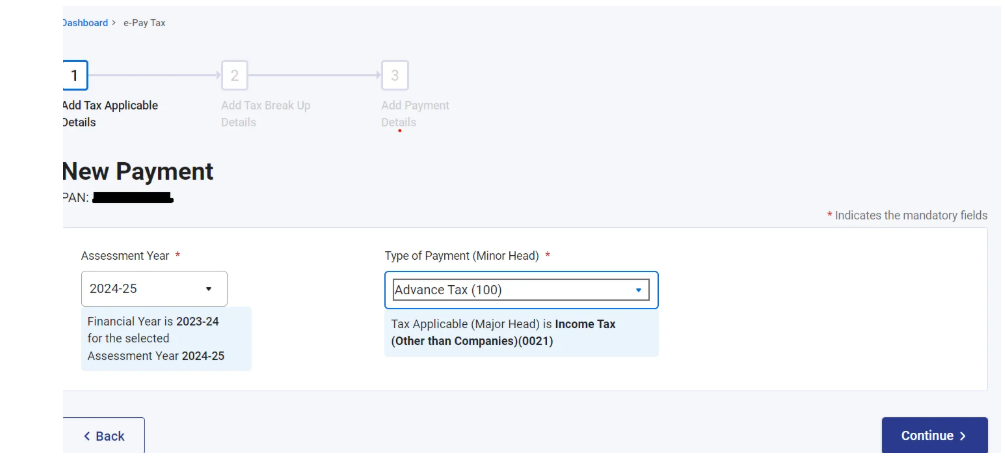
Step 5: Choose Assessment Year and Payment Type
Select the following details carefully:
- Assessment Year – Choose the relevant financial year
- Type of Payment (Minor Head) – Select Advance Tax (200)
After selecting the correct options, click “Continue.”
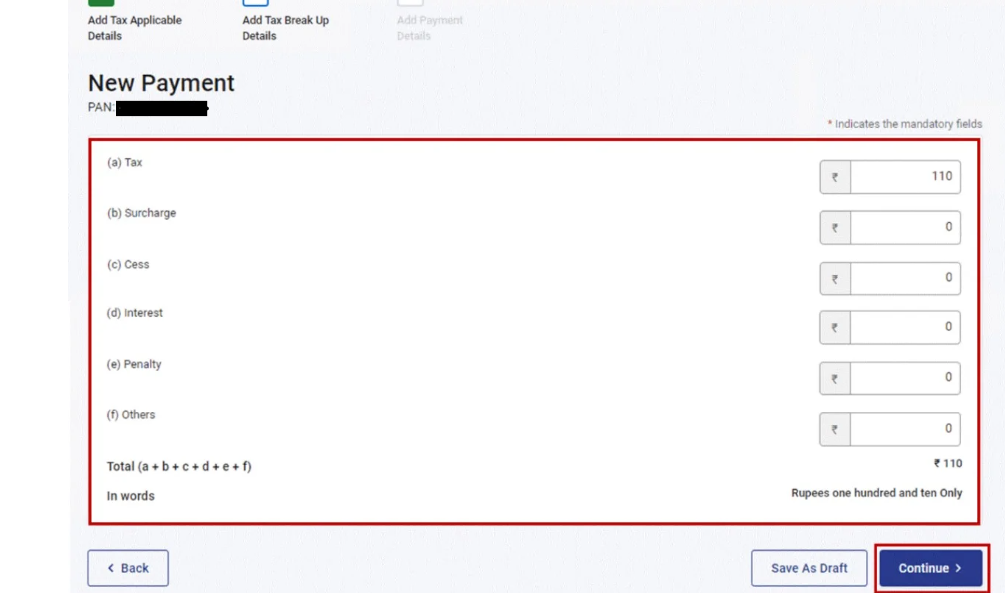
Step 6: Enter Tax Payment Details
Fill in the required tax payment details accurately under the relevant categories, such as:
- Income tax amount
- Surcharge (if applicable)
- Health and education cess
- Interest or penalty (if applicable)
After entering the details, click “Continue.”
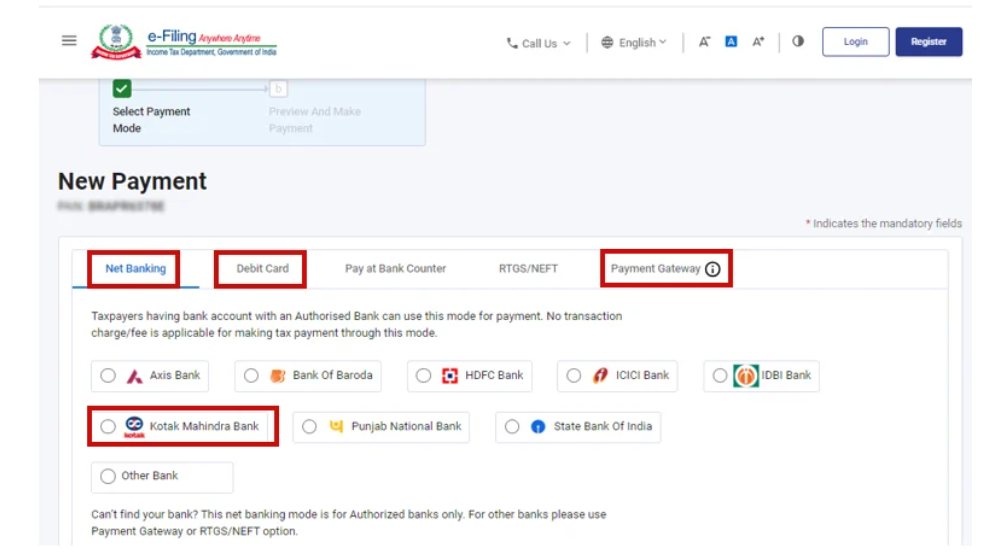
Step 7: Select the Payment Mode
Choose your preferred payment method from the available options:
- Net Banking
- Debit Card
- Payment Gateway
- UPI (where available)
Click “Continue” after selecting the payment mode.
Step 8: Preview and Verify Payment Details
Review all the details entered carefully before making the payment.
If any errors are found, you can edit the information. Once the details are correct, click “Pay Now.”
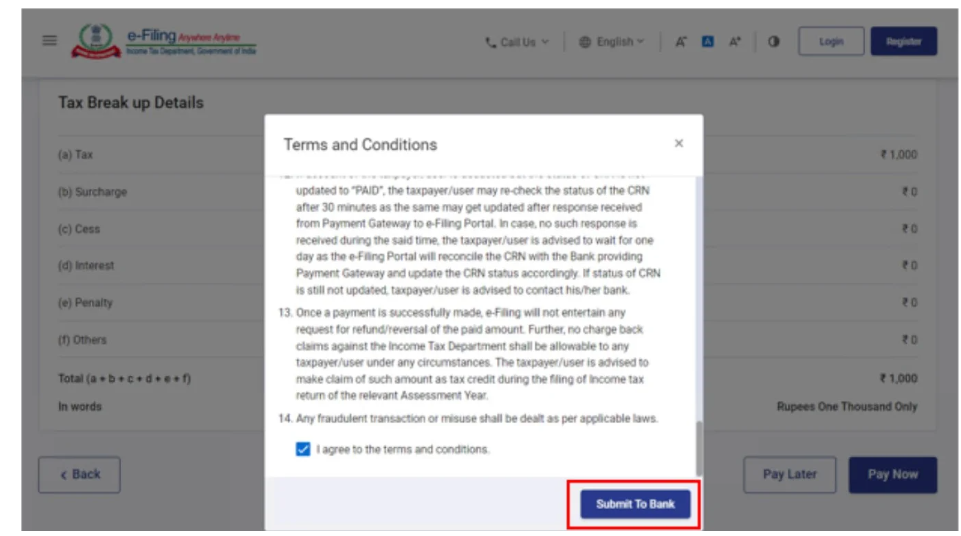
Step 9: Accept Terms and Proceed to Bank
Tick the checkbox confirming that you have reviewed the terms and conditions, then click “Submit to Bank.”
You will be redirected to the selected bank or payment gateway page to complete the transaction securely.
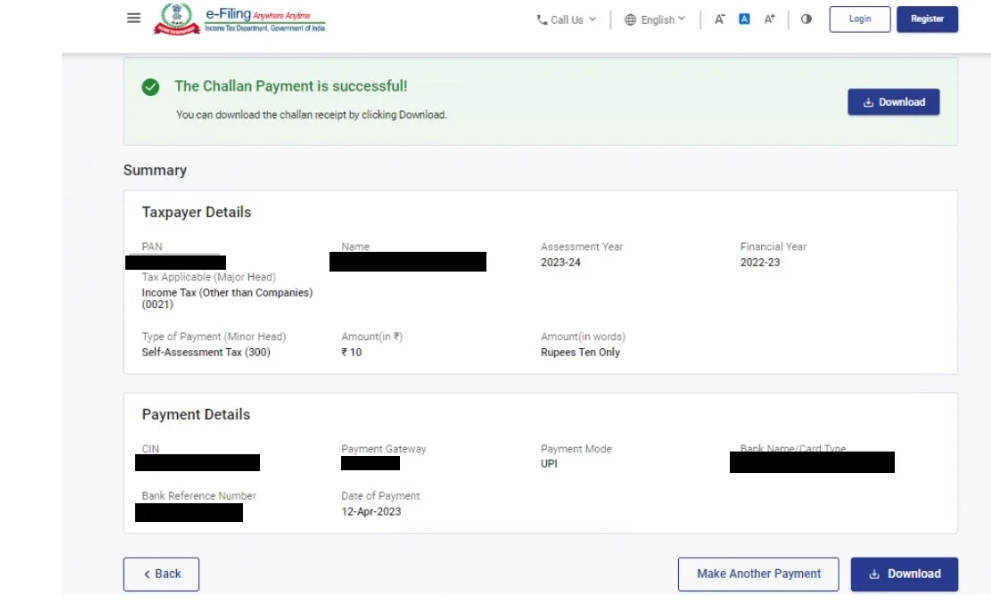
Step 10: Download the Challan Receipt
After successful payment, a Challan Form (CRN – Challan Reference Number) will be generated.
Make sure to:
- Download the challan receipt
- Save it for your records
- Use it while filing your income tax return
Keeping the challan receipt is important for proof of payment and future tax compliance.
Option B: Steps to Pay Advance Tax After Logging in to the Income Tax Portal
Taxpayers can also make advance tax payments by logging in to their account on the Income Tax e-Filing portal. This method is useful when you want to view your tax details, payment history, or outstanding liabilities before making the payment. Logging in provides better control and visibility over your tax records and ensures accurate submission of tax payments.
Follow the steps below to pay advance tax after logging in to the income tax portal.
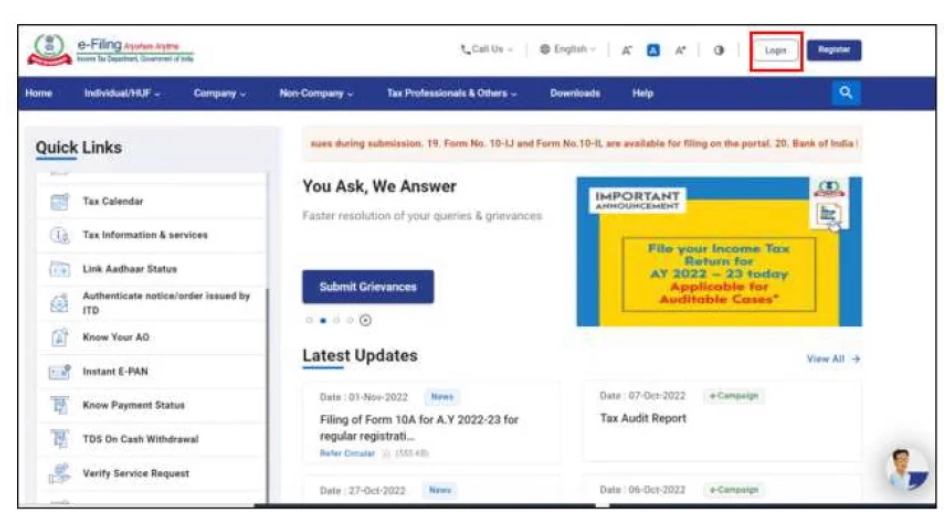
Step 1: Log in to the Income Tax e-Filing Portal
Visit the official Income Tax e-Filing portal and click on the “Login” option available on the home page.
Enter your login credentials, including:
- User ID (PAN)
- Password
- Captcha code
After entering the details, click “Login” to access your dashboard.
Step 2: Navigate to the e-Pay Tax Option
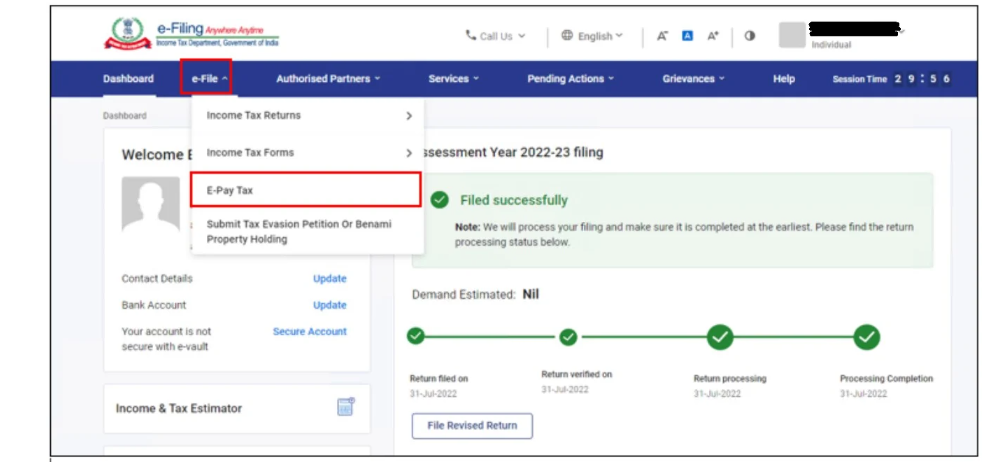
Once you are logged in, go to the Dashboard.
Under the “e-File” menu, select the option “e-Pay Tax.” This section allows you to initiate various types of tax payments, including advance tax.
Step 3: Start a New Tax Payment
On the “e-Pay Tax” page, click on the “New Payment” option to begin the process of making an online tax payment.
This step will open the payment selection page where you can choose the appropriate tax category.
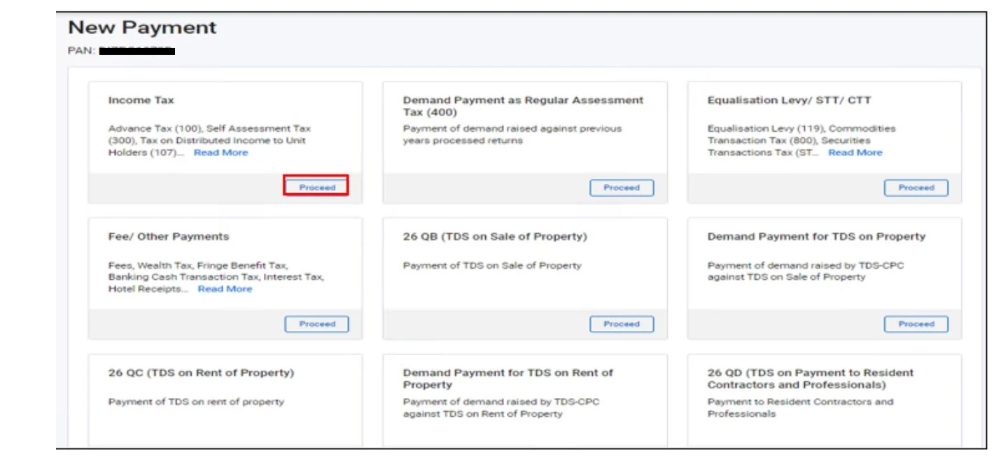
Step 4: Select the Income Tax Payment Category
On the New Payment page, locate the “Income-tax” section and click “Proceed.”
This action will direct you to the tax payment form where you can select the assessment year and payment type.
Step 5 to Step 10: Complete the Payment Process
From this stage onward, follow Step 5 to Step 10 outlined in Option A to complete your advance tax payment. These steps include:
- Selecting the assessment year and payment type (Advance Tax – 200)
- Entering the tax payment details
- Choosing the payment mode
- Verifying the information
- Submitting the payment
- Downloading the challan receipt
Carefully reviewing all details before submission helps prevent errors and ensures smooth tax compliance.
Confirmation After Successful Payment
After completing the payment successfully, the Income Tax Department will send confirmation notifications to your registered contact details.
You will receive:
- A confirmation email on your registered email ID
- An SMS notification on your registered mobile number
- A Challan Reference Number (CRN) as proof of payment
It is advisable to save the challan receipt and confirmation message for future reference and while filing your income tax return.
Disclaimer: The content on this website is for informational purposes only and does not constitute legal, financial, or professional advice. Please consult qualified experts before acting on any information. K M GATECHA & CO LLP accepts no liability for errors, omissions, or outcomes from the use of this content. This site is not an advertisement or solicitation.