

India’s e-commerce industry continues to expand rapidly, creating opportunities for businesses of every size. However, selling products online comes with specific GST compliance requirements that differ from those applicable to traditional offline businesses.
The key insight is that e-commerce sellers cannot automatically rely on the usual turnover-based GST exemption. Registration requirements depend on the type of goods or services sold, the platform used, and the applicable provisions of GST law. Certain exceptions are available, but sellers must understand whether they qualify before starting operations.
By the end of this guide, you will understand who needs GST registration, which documents to prepare, how to apply step by step, and the potential consequences of failing to comply with the applicable requirements.
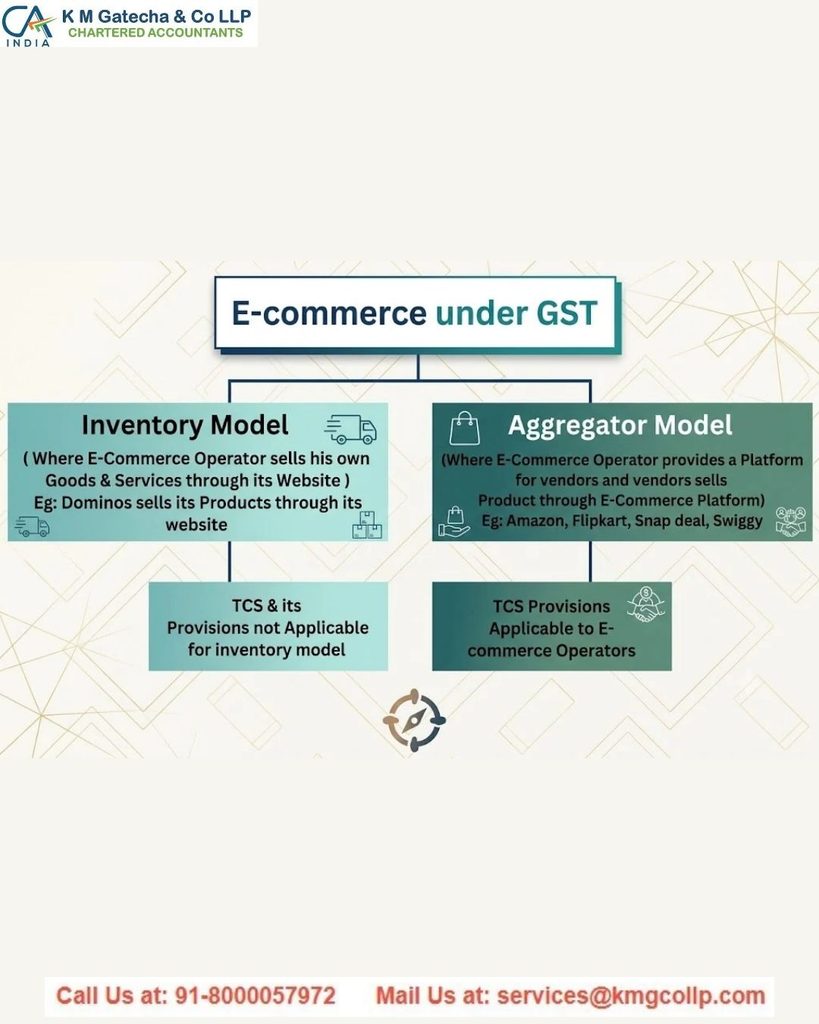
Why GST Rules Are Different for Online Sellers
GST compliance for e-commerce businesses involves specific responsibilities for both the marketplace and the seller. Applying the rules for traditional offline businesses without considering these provisions can lead to incorrect assumptions about registration requirements.
Three important factors explain why e-commerce GST compliance requires special attention.
1. The Two-Party System: E-commerce Operator and E-commerce Seller
GST law distinguishes between an E-commerce Operator (ECO) and an E-commerce Seller.
- E-commerce Operator: The platform that owns, operates, or manages the digital marketplace, such as Amazon or Flipkart. Depending on the applicable provisions, the operator may have obligations relating to tax collection, reporting, and other compliance requirements.
- E-commerce Seller: The business or individual selling goods or services through the platform. The seller is generally responsible for complying with the GST requirements applicable to their own supplies, including charging GST where required, filing returns, and paying the applicable tax.
Although both parties participate in the transaction, their legal responsibilities are different.
2. Why Registration Requirements Can Apply Regardless of Turnover
GST law contains special registration provisions for certain businesses selling through e-commerce platforms. These rules were designed to support tax reporting and transparency in marketplace transactions.
Under Section 52 of the CGST Act, eligible e-commerce operators collect Tax Collected at Source (TCS) on applicable net taxable supplies and report the relevant information to the tax authorities. The collected amount is credited to the seller’s electronic cash ledger.
However, the rules are not identical for every seller. Certain notified exceptions permit eligible sellers to operate without GST registration, subject to specified conditions. Therefore, sellers should determine their eligibility under the applicable provisions rather than assuming that either registration or exemption applies universally.
3. India’s Growing E-commerce Market
India’s e-commerce industry is expanding rapidly, with market projections indicating that it could reach approximately ₹29.8 lakh crore by 2030.
As online commerce grows, understanding GST obligations becomes increasingly important for businesses operating through digital marketplaces. Proper compliance helps sellers maintain accurate records, meet their tax responsibilities, and manage their operations more effectively.
Who Actually Needs GST Registration? The Practical Answer
The registration requirement depends on what you sell, how you sell it, and whether you qualify for an applicable exception. The following categories explain the main distinctions.
Goods Sellers on Marketplaces: Check Registration Before Your First Sale
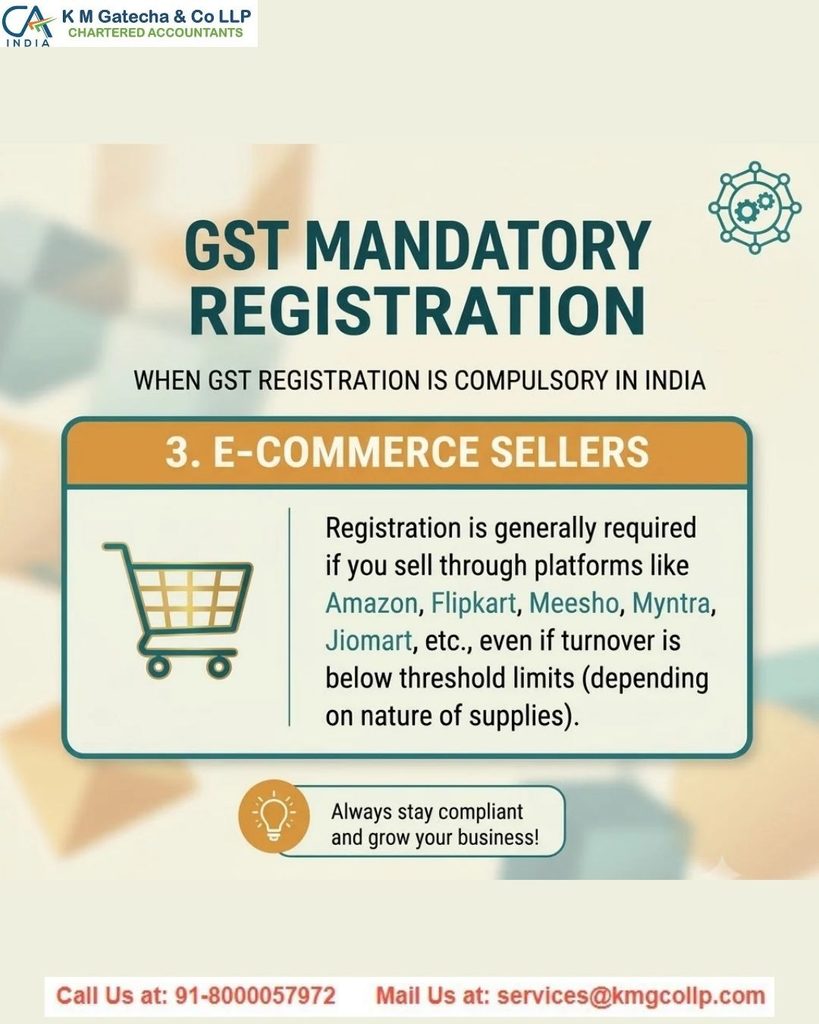
If you sell physical goods through Amazon, Flipkart, Meesho, Myntra, Nykaa, JioMart, Snapdeal, or another online marketplace, you should check the special registration provisions before listing or selling your products.
Section 24(ix) of the CGST Act generally addresses compulsory registration for persons supplying goods or services through an e-commerce operator required to collect tax at source under Section 52. However, subsequent amendments and notifications provide an exemption for eligible small goods suppliers, subject to prescribed conditions.
Consequently, it is not accurate to say that every goods seller must obtain a GSTIN regardless of turnover or that even a single sale automatically results in a penalty.
Before commencing sales, determine whether you are required to register or whether you qualify for the applicable exemption.
Service Sellers: A Conditional Exception
Service providers such as designers, tutors, and consultants selling through digital platforms may qualify for a turnover-based registration exemption, subject to the applicable GST rules and conditions.
For many service providers, the general threshold is ₹20 lakh, although lower thresholds may apply in certain states and situations. The registration requirement also depends on the nature of the service and the applicable provisions governing the platform.
A separate rule applies to specified services covered by Section 9(5) of the CGST Act. These include certain services supplied through e-commerce operators, such as specified passenger transportation, accommodation, and restaurant services. For notified supplies, the operator is responsible for paying GST under the applicable provisions.
For example, a freelance designer offering services through a digital platform may be treated differently from a restaurant providing food through a delivery platform. The relevant service category and tax provisions determine the obligations.
D2C Sellers Using Shopify or WooCommerce
Businesses operating their own direct-to-consumer (D2C) websites through platforms such as Shopify or WooCommerce should assess their GST obligations separately from sellers using third-party marketplaces.
Operating a website does not, by itself, make every business subject to compulsory registration under the e-commerce-operator provisions. However, other GST rules may require registration.
For example, the general registration threshold for suppliers of taxable goods can be affected by whether they make interstate supplies. Certain interstate taxable supplies of goods trigger compulsory registration, subject to specific exceptions and conditions.
Therefore, a D2C brand shipping products to customers in other states should assess the applicable interstate supply rules before beginning operations. A business selling only within its state may have different registration obligations depending on its turnover, product category, and eligibility for exemptions.
The practical approach is to evaluate your business model, sales locations, and applicable GST notifications before deciding whether registration is required.
Quick Reference Table: GST Registration for E-commerce Sellers
| Seller Type | Platform | Is GST Registration Mandatory? | Applicable Threshold |
| Goods seller | Amazon, Flipkart, Meesho | Depends on eligibility for the applicable exemption | Generally, ₹40 lakh in many states, subject to conditions |
| Goods seller | Own website, intra-state sales only | Required if the applicable registration threshold is exceeded | Generally, ₹40 lakh in many states |
| Service seller | Marketplace where TCS applies | Depends on the applicable registration provisions and exemptions | Generally, ₹20 lakh in many states for services |
| Service seller | Own website without marketplace TCS | Generally required after crossing the applicable threshold | Generally, ₹20 lakh in many states |
| Restaurant, cab, or accommodation service provider | Zomato, Swiggy, OYO, or similar platforms | The platform may be liable to pay GST for specified services; seller obligations vary | Depends on the service and applicable provisions |
Note: GST registration requirements depend on the nature of the supply, the state, turnover, and applicable notifications. Certain exceptions apply to eligible e-commerce sellers.
The Rule Most Sellers Get Wrong
One of the most common misunderstandings about GST registration is the difference between Section 22 and Section 24 of the CGST Act.
Section 22 establishes the general turnover-based registration requirements, while Section 24 provides for compulsory registration in specified circumstances, subject to applicable exceptions and notifications.
Many businesses assume that the general turnover threshold automatically applies to every online seller. However, e-commerce transactions may be governed by additional provisions, so sellers must check the rules applicable to their particular business model.
For example, eligible small suppliers of goods selling through e-commerce operators may qualify for an exemption from mandatory registration if they satisfy the prescribed conditions. Therefore, it is not correct to conclude that every seller must register before making even ₹1 in sales.
Marketplaces may also require sellers to provide GST details or other registration information during onboarding, depending on the seller category and applicable platform policies.
Documents Required Before Applying for GST Registration
Preparing the necessary documents in advance can make the GST registration process easier. The documents required depend on the legal structure of your business.
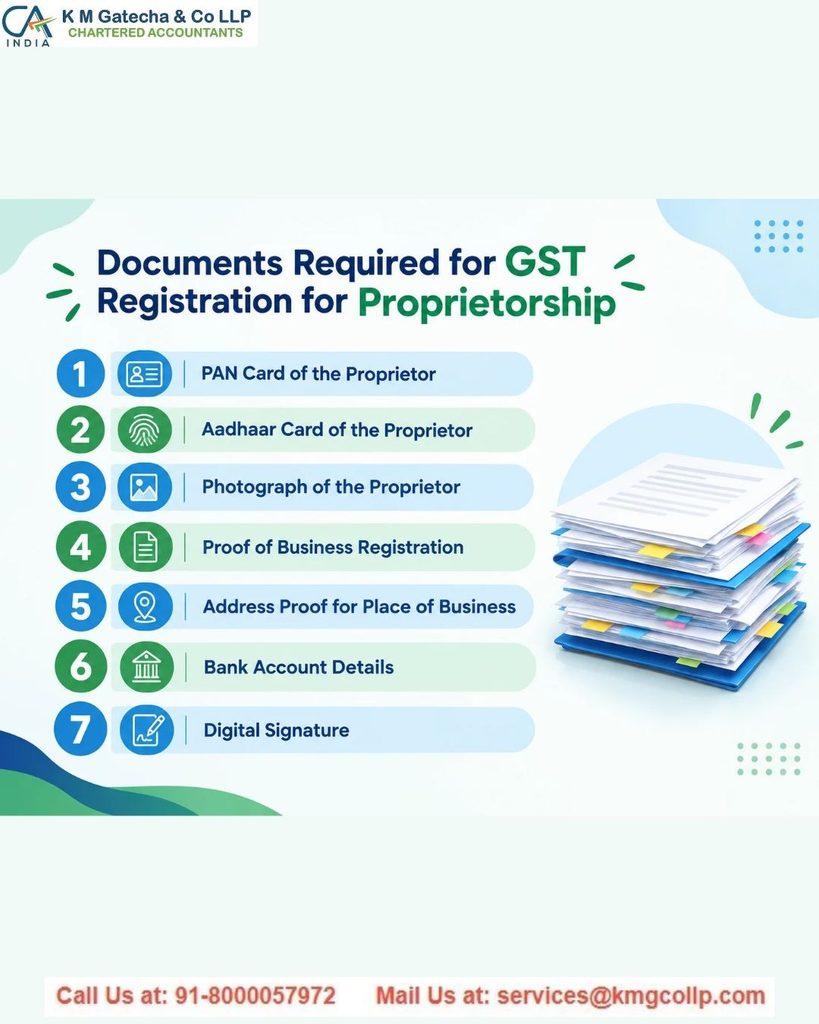
For Sole Proprietors and Individual Sellers
If you operate as an individual seller or sole proprietor, prepare the following documents:
- PAN Card: Your personal PAN, as a sole proprietorship does not have a separate PAN.
- Aadhaar Card: Used for identity verification and applicable e-KYC procedures.
- Photograph: A recent passport-size photograph, following the portal’s prescribed file specifications.
- Business Address Proof:
- Owned premises: A recent electricity bill or property tax receipt.
- Rented premises: A rent agreement and the required consent or supporting documents from the property owner.
- Home-based business: Acceptable address proof and any additional declaration or consent required for the premises.
- Bank Account Proof: A cancelled cheque or bank statement showing the relevant account details, where required.
- Contact Details: An active mobile number and email address for OTP verification and official communications.
For Partnership Firms
Partnership firms should prepare the following:
- PAN and identity documents for the partners, as applicable.
- Partnership deed.
- Business address proof.
- An authorisation letter identifying the Primary Authorised Signatory.
- Other supporting documents required for the firm’s registration.
For Private Limited Companies and LLPs
Companies and Limited Liability Partnerships should generally prepare:
- PAN of the company or LLP, along with the relevant identity details of directors or designated partners.
- Certificate of Incorporation issued by the Ministry of Corporate Affairs.
- Memorandum of Association (MOA) and Articles of Association (AOA) for a private limited company, or the LLP Agreement for an LLP.
- Board resolution or other authorisation document appointing the authorised signatory, where applicable.
- Registered office address proof.
- Aadhaar and photographs of the relevant directors or designated partners, as required.
You can also review the private limited company registration services and GST registration services for additional guidance.
Important: When completing the GST registration application, select the reason for registration that accurately reflects your circumstances. If Section 24 applies to your business, choose the corresponding compulsory-registration option. Do not select a turnover-based reason unless it correctly describes your registration requirement.
Step-by-Step GST Registration Process for E-commerce Sellers
Follow these steps to submit your GST registration application through the official GST portal.
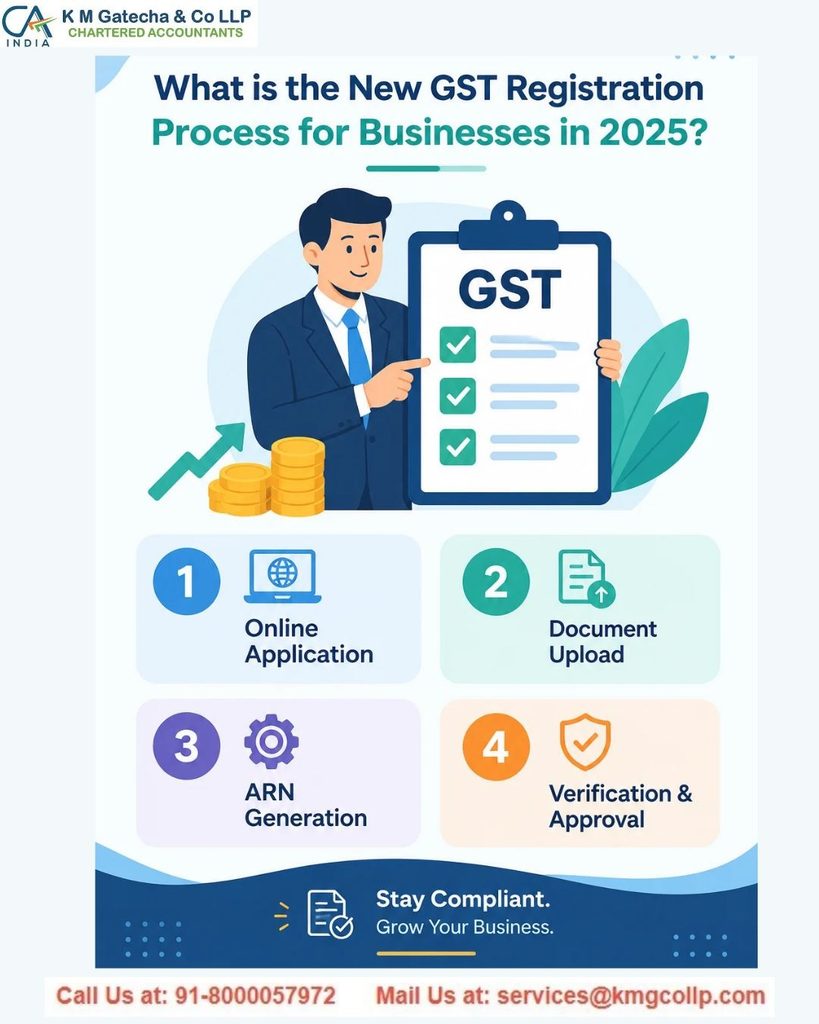
Step 1: Visit the Official GST Portal
Open gst.gov.in and navigate to:
Services → Registration → New Registration
Select Taxpayer as the taxpayer type, where applicable, to begin the registration process.
Step 2: Complete Part A and Verify Your Contact Details
Enter your basic information, including:
- Legal name as recorded against your PAN.
- PAN number.
- State and district.
- Email address.
- Mobile number.
The portal will send OTPs to your registered mobile number and email address. Verify both to proceed.
After successful verification, you will receive a Temporary Reference Number (TRN). Save this number securely so you can continue your application later. The TRN is generally valid for 15 days.
Step 3: Complete Part B Using Your TRN
Return to the GST portal and access your application using the TRN. Complete the remaining sections with accurate business information.
Important details include:
- Business Details: Enter your trade name, business constitution, and date of commencement, as applicable.
- Principal Place of Business (PPOB): Provide the address of your principal business premises.
- Additional Places of Business: Declare other business locations where required. Sellers using fulfilment centres or warehouses in other states should assess their registration obligations separately.
- Reason for Registration: Select the applicable registration category based on the relevant GST provisions.
- HSN/SAC Codes: Provide the appropriate classification codes for your goods or services.
- Bank Account Details: Enter the required banking information and supporting details.
Review each section before proceeding to document uploads.
Step 4: Upload the Required Documents
Upload the documents requested by the portal in the permitted formats and file sizes displayed in the application.
Ensure that all documents are clear, legible, and consistent with the information entered in the form. Use descriptive filenames, such as PAN_BusinessName, to make your documents easier to identify.
Incorrect information, unclear scans, or files that do not meet portal requirements may delay processing.
Step 5: Complete Verification and Submit the Application
Complete the prescribed verification process. Where available and applicable, Aadhaar-based authentication can help streamline identity verification.
Submit the application using the verification method permitted for your business, such as an Electronic Verification Code (EVC) or Digital Signature Certificate (DSC), as applicable.
After successful submission, you will receive an Application Reference Number (ARN). Keep it available to track the progress of your application.
Step 6: Track the Application and Respond to Queries
Monitor your application status through the GST portal using the relevant reference details.
If the GST officer raises a clarification or document request through Form GST REG-03, respond within the deadline specified in the notice. The response is generally submitted using Form GST REG-04.
Once the application is approved, your GSTIN will be issued, and you can download the registration certificate, generally in Form GST REG-06, from the portal.
Processing time depends on the application, verification requirements, and whether the officer requests additional information. Check the portal for the latest status and any deadlines communicated by the GST authorities.
The Multi-State GST Registration Challenge: What Amazon FBA Sellers Should Know
One important GST compliance issue for e-commerce businesses is the possibility of requiring registration in multiple states. This is particularly relevant for sellers using Amazon’s Fulfilment by Amazon (FBA) service, where inventory may be stored in warehouses located across India.
Each GSTIN is state-specific. If your business stores inventory in an Amazon FBA warehouse located outside your home state, that location may create a requirement for GST registration in the respective state, depending on the arrangement and applicable GST provisions.
However, you do not automatically need a separate GSTIN for every state where you deliver products. If your inventory is stored in your registered state and you supply goods to customers in other states, you can generally make eligible interstate supplies using your existing GSTIN. The registration implications of storing inventory in another state are different and must be assessed separately.
Before enrolling in Amazon’s Pan-India FBA programme, review your inventory placement report and identify the states in which your stock may be stored. Each additional state could involve separate registration, return filing, record-keeping, and compliance costs. Consider these expenses before deciding to expand your warehouse footprint.
What to Do Immediately After GST Registration
Receiving your GSTIN is only the beginning of GST compliance. Once your registration is approved, there are several important steps to complete before and after starting your e-commerce operations.
1. Add Your GSTIN to Your Seller Accounts
E-commerce marketplaces such as Amazon, Flipkart, and Meesho provide sections in their seller portals for entering relevant GST information.
Update your GSTIN and other required tax details in your seller account. Ensure that the information matches your GST registration records so that the platform can complete its applicable verification procedures and enable the relevant selling features.
2. Prepare GST-Compliant Invoices
Invoices must contain the information prescribed under GST law. Depending on the transaction, this generally includes the seller’s GSTIN, invoice number and date, recipient details where required, HSN or SAC classification, taxable value, and applicable tax amounts.
The tax breakdown generally includes:
- CGST and SGST: Applicable to taxable intra-state supplies.
- IGST: Generally applicable to taxable interstate supplies.
Many marketplaces provide automated invoice-generation facilities. Nevertheless, review your initial invoices to ensure that the business details, product classifications, taxable values, and tax calculations are accurate.
3. Understand TCS and Reconcile Your Credit
E-commerce operators covered by Section 52 of the CGST Act collect Tax Collected at Source (TCS) on applicable net taxable supplies and report the amounts collected to the tax authorities.
TCS is not ordinarily an additional business expense in the same way as a platform fee. The amount collected is credited to the seller’s electronic cash ledger, subject to the prescribed reporting and reconciliation process.
To manage TCS effectively:
- Reconcile marketplace sales statements with your GST records.
- Check the TCS details reported by the e-commerce operator on the GST portal.
- Verify that the reported amounts match your eligible transactions.
- Ensure that the available credit is properly reflected and used in accordance with GST rules.
TCS credit should not be confused with Input Tax Credit (ITC). TCS is generally reflected in the electronic cash ledger and can be used to discharge eligible liabilities through the prescribed process; it is not automatically refunded simply because a monthly return is filed.
4. Understand Your GST Return Filing Calendar
E-commerce sellers must identify the returns applicable to their registration and follow the relevant filing deadlines.
| GST Return | Purpose | General Due Date |
| GSTR-1 | Reports outward supplies | 11th of the following month for monthly filers |
| GSTR-3B | Summarises tax liabilities and eligible credits and facilitates tax payment | 20th of the following month for monthly filers |
| GSTR-9 | Annual GST return, where applicable | Generally 31 December following the relevant financial year |
Note: Due dates may vary according to the filing frequency, applicable notifications, and extensions announced by the authorities.
Nil returns: If a return is required for a tax period, it may still need to be filed even when there are no sales or tax liabilities to report. Failure to file can result in late fees and other consequences under the applicable rules.
Penalties for Selling Without Required GST Registration
Operating an e-commerce business without obtaining GST registration when legally required can lead to significant financial and operational consequences. Sellers should understand the risks and verify their registration obligations before commencing taxable activities.
1. Financial Penalties
Under Section 122 of the CGST Act, penalties may apply to specified offences, including certain cases involving taxable supplies made without registration. The applicable penalty depends on the nature of the violation and the relevant legal provision.
For specified cases of tax evasion, the penalty may be linked to the tax amount involved, subject to statutory minimums and other applicable conditions. The penalty is not automatically the same in every case.
2. Interest on Unpaid Tax
Interest may be payable on outstanding tax liabilities under the applicable GST provisions. The rate and period of calculation depend on the circumstances and the relevant statutory requirements.
3. Marketplace Account Restrictions
Marketplaces may require valid tax information and supporting documents before permitting sellers to list or sell particular products. Sellers who fail to meet the platform’s applicable requirements may face restrictions, suspension, or deactivation of their accounts.
The consequences depend on the marketplace’s policies and the seller’s specific circumstances.
4. Inability to Claim Input Tax Credit
A business that is not registered under GST generally cannot claim ITC in the same way as a registered taxable person. As a result, GST paid on eligible business expenses, such as inventory, packaging, shipping, or advertising, may become part of the business’s costs rather than being available as a tax credit.
5. Increased Compliance and Legal Risks
GST authorities use digital reporting systems to compare information submitted by taxpayers, e-commerce operators, and other reporting entities. Discrepancies between sales records, tax returns, and reported TCS amounts may lead to queries, scrutiny, or further action.
Maintaining accurate records, filing the required returns on time, and obtaining registration whenever legally necessary can help e-commerce sellers reduce avoidable compliance risks.
Platform-Specific GST Guidance: Amazon, Flipkart, Meesho, and Shopify
GST registration and compliance can differ depending on the platform you use to sell products. Understanding each platform’s requirements can help you avoid onboarding issues, manage tax records, and maintain compliance.
Amazon
Amazon sellers should provide the GST details required for their seller account and complete the platform’s applicable tax verification process.
- GSTIN Submission: Log in to Amazon Seller Central and look for the tax information section under account settings. Menu names may change as the platform updates its interface.
- TCS Compliance: Amazon reports applicable Tax Collected at Source (TCS) details under the GST framework. Reconcile the platform’s reports with the information available on the GST portal.
- GSTR-8: E-commerce operators required to collect TCS generally file GSTR-8 by the 10th of the following month, subject to applicable rules and extensions. This filing is the operator’s responsibility.
- Amazon FBA: If you use Fulfilment by Amazon (FBA), check the states in which your inventory is stored. Warehousing arrangements may affect your GST registration obligations in those states.
Flipkart
Flipkart sellers should ensure their GST information is accurate and updated in the seller portal.
- GSTIN Submission: Access Flipkart Seller Hub and locate the account settings or tax information section to enter the required GST details.
- Flipkart Fulfilment (FBF): Sellers using FBF should check where their inventory is stored and assess whether registrations are required in additional states.
- Tax Reconciliation: Compare Flipkart settlement statements, sales reports, and TCS information with your GST records to identify discrepancies and ensure accurate reporting.
Meesho
Individuals and small businesses selling through Meesho should verify the GST requirements applicable to their seller category before starting operations.
- Home-Based Sellers: A residential address may be used as the principal place of business if the applicable conditions are satisfied and the required address documents are provided. Depending on the circumstances, these may include an electricity bill, a declaration, or consent from the property owner.
- GST Registration: Whether a GSTIN is required depends on the nature of the goods or services, turnover, and applicable registration provisions and exemptions.
- TCS Deductions: Where the applicable provisions require it, Meesho collects TCS on eligible net taxable supplies. Review settlement statements and reconcile the reported amounts with the GST portal.
Shopify and WooCommerce: GST for D2C Businesses
Businesses using Shopify or WooCommerce to sell directly to customers should configure their tax processes according to their products, customer locations, and registration status.
- Tax Configuration: Check whether your store’s tax settings or connected billing tools correctly calculate the applicable CGST and SGST or IGST based on the place of supply and transaction details.
- GST-Compliant Invoices: Ensure that invoices contain the information required under GST law, including applicable tax rates, taxable values, and HSN or SAC codes.
- E-invoicing: Businesses whose aggregate turnover exceeds the applicable threshold must assess whether e-invoicing requirements apply. The general threshold has been reduced to ₹5 crore, subject to the applicable rules and exclusions. Where e-invoicing applies, a registered Invoice Registration Portal must generate the Invoice Reference Number (IRN) and QR code for covered invoices. Shopify or WooCommerce alone may not provide the complete compliance process without suitable integration.
GST Registration Mistakes That Can Cause Delays or Rejections
Small errors in a GST registration application can lead to clarification requests, additional verification, or delays. Review the following points before submitting your application.
1. Mismatch Between PAN Details and the Application
What to check: Ensure that the legal name entered in the application matches the name recorded against your PAN.
Differences in spelling, spacing, or other identifying details can cause verification problems. Check the information carefully before proceeding.
2. Selecting the Wrong Registration Reason
What to check: Select the registration category that accurately reflects your business circumstances and the applicable GST provisions.
Do not automatically choose a turnover-based reason or a Section 24 category without confirming which applies to your business. The correct selection depends on your registration requirement and any relevant exemption.
3. Incomplete Proof of Business Address
What to check: Make sure your address documents support the type of premises declared in the application.
- Owned premises: Provide acceptable ownership or address evidence.
- Rented premises: Keep the rent agreement and any required owner consent or supporting documents ready.
- Home-based business: Confirm that your address proof and any required declaration or consent meet the applicable requirements.
Missing supporting documents may result in a clarification notice, including Form GST REG-03.
4. Blurry or Incorrectly Formatted Documents
What to check: Review every uploaded document for clarity, completeness, and compliance with the file format and size limits displayed on the portal.
Use legible scans and descriptive filenames. If a document exceeds the permitted size, reduce it without making the text difficult to read.
5. Incorrect HSN or SAC Classification
What to check: Identify the correct HSN code for your goods or SAC code for your services before completing the application and preparing invoices.
An incorrect classification can lead to tax-rate errors and inconsistencies in GST returns. Verify the applicable classification and rate rather than choosing a code solely because it appears similar to your product.
6. Overlooking Additional States Used for Inventory Storage
What to check: If you use Amazon FBA, Flipkart Fulfilment, or another warehousing arrangement, identify where your inventory is held.
Storing goods in another state may affect your registration obligations, depending on the legal and operational arrangement. Assess these requirements before moving inventory or enrolling in a multi-state fulfilment programme.
7. Allowing the TRN to Expire
What to check: Complete Part B of the application within the validity period of your Temporary Reference Number (TRN).
A TRN is generally valid for 15 days. If it expires before the application is completed, you may need to generate a new TRN and repeat the relevant steps. Keep your documents ready before beginning the application to minimise delays.
Disclaimer: The content on this website is for informational purposes only and does not constitute legal, financial, or professional advice. Please consult qualified experts before acting on any information. K M GATECHA & CO LLP accepts no liability for errors, omissions, or outcomes from the use of this content. This site is not an advertisement or solicitation.


